How to Run Google Ads for Your Local Business (Step-by-Step Guide)
Google Ads for Local Business in Noida & Ghaziabad | SSB Digital India
Google Ads for Local Businesses: A Complete Beginner’s Guide
Are you a local business owner struggling to attract nearby customers? Whether you run a salon in Connaught Place Delhi, a steel fabrication shop in Alpha II Greater Noida West, or a home repair service in Sector 62 Noida, Google Ads can help drive local traffic and boost leads effectively — if you do it the right way.
Let’s break down the complete, beginner-friendly guide on how to run Google Ads for your local business.
Why Google Ads Works for Local Businesses
- Your ad appears when someone searches “AC repair in Gaur City” or “spa near me.”
- You only pay when someone clicks (PPC model).
- You can target people based on location, device, and intent.
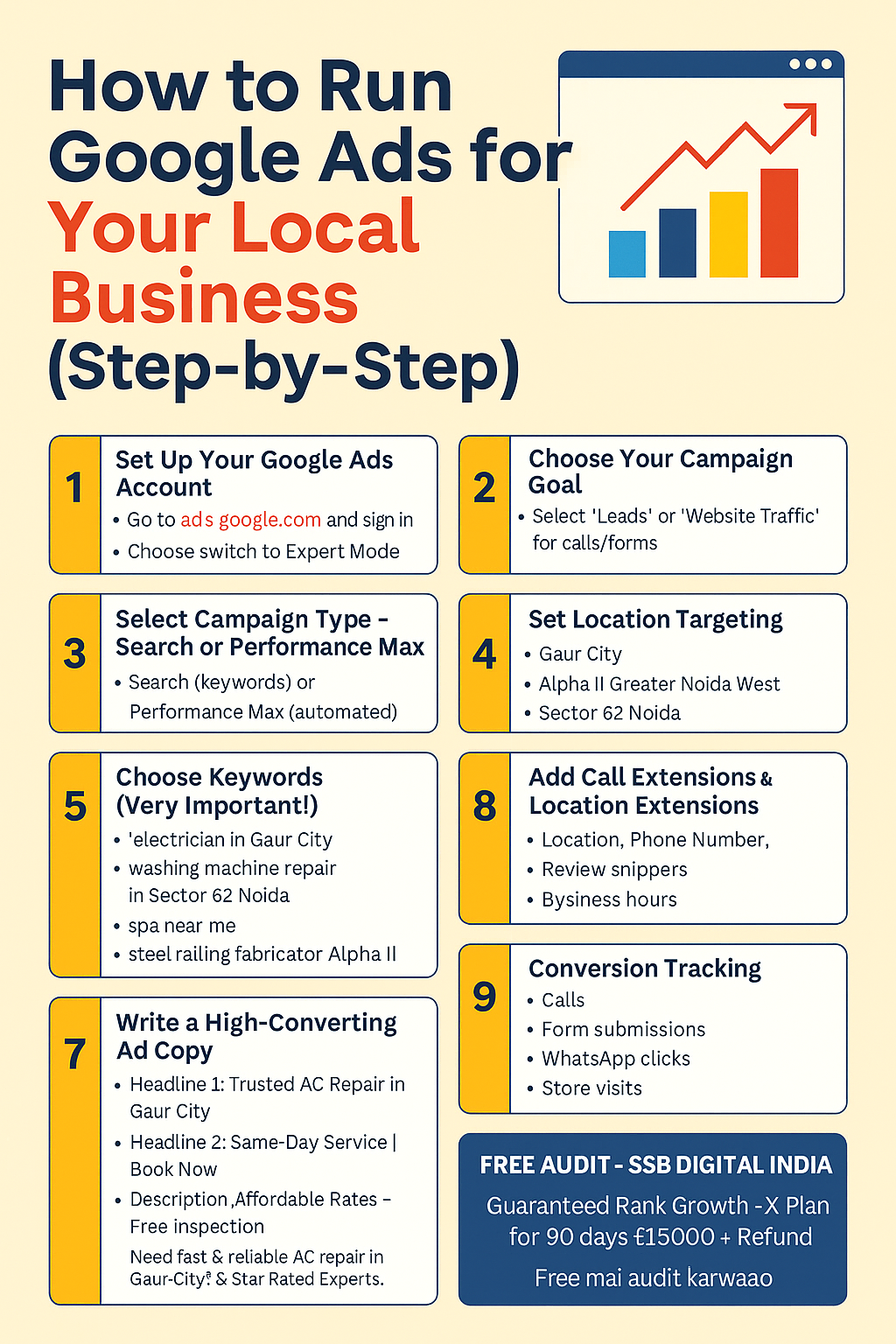
Step 1: Set Up Your Google Ads Account
- Go to https://ads.google.com
- Click on "Start now"
- Sign in with your Gmail account and follow the setup prompts
- Choose “Switch to Expert Mode” to get full campaign control
Step 2: Choose Your Campaign Goal
Google will ask: “What’s your main advertising goal?”
- Choose “Leads” or “Website Traffic” if you want people to call or fill out forms.
- If you own a fabrication business in Crossings Republik, Leads is the best option.
Step 3: Select Campaign Type — Search, Performance Max, or Local
- Search Campaigns: Great for keywords like “plumber in Sector 62 Noida”
- Performance Max: Works well for automated placements across Google Maps, Search, YouTube, and Gmail
Step 4: Set Location Targeting
Target people based on specific areas where your business operates:
- Gaur City
- Alpha II Greater Noida West
- Sector 62 Noida
- Connaught Place Delhi
- Noida Extension
- Indirapuram
- Vasundhara
- Mayur Vihar
Step 5: Choose Keywords (Very Important!)
Use keywords that match local intent. Avoid too broad terms. Example keywords:
- electrician in Gaur City
- washing machine repair in Sector 62 Noida
- spa near me
- steel railing fabricator Alpha II
Tip: Use tools like Google Keyword Planner or UberSuggest for ideas.
Step 6: Set Your Budget
- Start small: ₹300–₹500 per day for local businesses
- Increase once you see conversions
- Pro tip: Use Manual CPC bidding initially for full control
Step 7: Write a High-Converting Ad Copy
Example format:
- Headline 1: Trusted AC Repair in Gaur City
- Headline 2: Same-Day Service | Book Now
- Headline 3: Affordable Rates – Free Inspection
- Description: Need fast & reliable AC repair in Gaur City? 5-Star Rated Experts. Call Now for Instant Booking!
Step 8: Add Call & Location Extensions
Google allows extra info:
- Location (linked to your Google Business Profile)
- Phone Number
- Review snippets
- Business hours
Make sure your GMB is optimized for areas like Noida, Greater Noida West, Indirapuram.
Step 9: Conversion Tracking
Track:
- Calls
- Form submissions
- WhatsApp clicks
- Store visits
Use Google Tag Manager or website backend to install tracking pixels.
Step 10: Monitor & Optimize Weekly
- CTR (Click-Through Rate) – aim 5%+
- Conversion Rate – aim 10%+
- Add negative keywords like “free,” “course,” “DIY”
Adjust bids for each area like Alpha II or Sector 62 based on performance.
Pro Tips for Local Ad Success
- Create separate campaigns per location (e.g., Gaur City, Sector 62)
- Use ad schedule to show ads during business hours
- Run call-only campaigns for fast lead generation
- Update ads with offers or seasonal discounts
Bonus: Use Performance Max with Local Targeting
This campaign type automates placements across:
- Search
- Display
- Maps
- YouTube
- Gmail
Let Google optimize placements for keywords like:
- balcony grill fabricator near Alpha II Greater Noida
- AC not cooling repair Connaught Place Delhi
Free Audit Offer — SSB Digital India
We offer a FREE Google Ads Audit for local businesses in:
- Gaur City
- Alpha II Greater Noida West
- Sector 62 Noida
- Connaught Place Delhi
- Indirapuram
- Vasundhara
- Mayur Vihar
Contact SSB Digital India
📞 Call / WhatsApp: 9315814211
📧 Email: ssbdigitalin@gmail.com
🌍 We serve clients PAN India — especially in Gaur City, Alpha II Greater Noida West, Sector 62 Noida, Connaught Place Delhi, and more.
Final Thoughts
Google Ads is a game-changer for small and local businesses. With the right targeting and setup, you can start seeing quality leads in just a few days. Whether you’re a salon in Connaught Place, a painter in Sector 62, or a fabricator in Greater Noida, the opportunity is massive.
Don’t wait. Start your ad today and grow like never before!
- Website Development services delhi ncr near me
- Google Expert In Greater Noida
- GMB SEO Expert in Noida – Rank Your Business in Top 3 on Google Maps
- GMB SEO Expert in Ghaziabad – Rank in Top 3 on Google Maps near me
- Boost Your Local Business with SEO in Noida, Greater Noida & Ghaziabad – SSB Digital India


Get In Touch
Centre Gaur Chowk, LG-35, Gaur City, West, Sector 4, Greater Noida, Uttar Pradesh 203207
+91 9315-814-211 | 8377014621 | 8377014691 | 7088091951
info@ssbdigitalindia.com
Quick Links
Home About Us Our Services Contact Us Privacy & Policy Refund & Cancellation Policy Terms and ConditionsPhoto Gallery