What’s the Difference Between Google Maps Listing and Google My Business (GMB)?
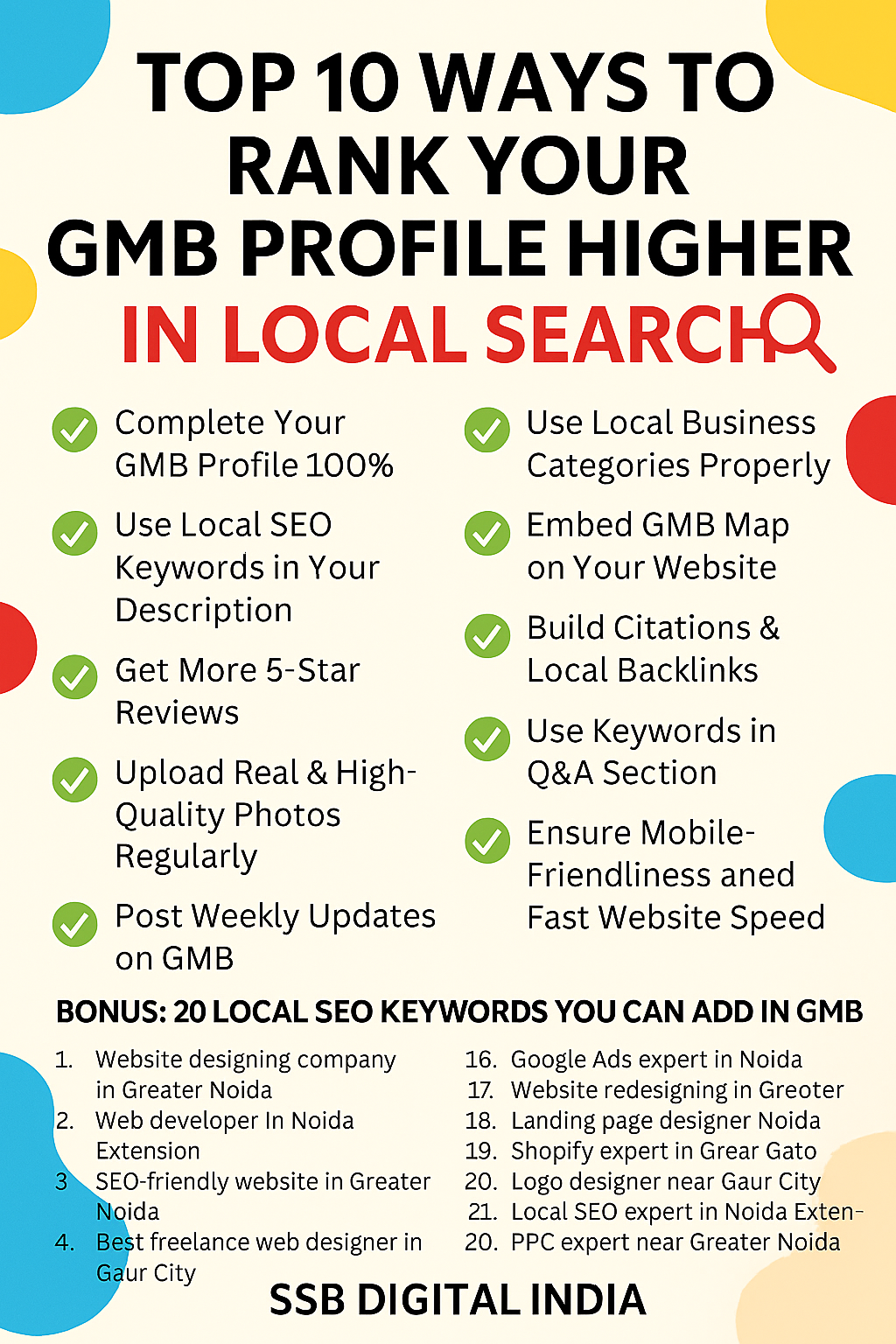
Google Maps Listing vs Google Business Profile: What’s the Difference & Why It Matters for Local SEO
In today’s competitive digital landscape, every local business needs strong visibility on Google Search and Google Maps. Whether you run a shop in Karol Bagh, a clinic in Dwarka, or a service business in Sector 62 Noida, your presence on Google can directly influence how many customers discover and contact you.
Two terms that many business owners often hear are Google Maps Listing and Google My Business (now called Google Business Profile). Many people assume they are the same, but they actually serve different roles in Local SEO and online business management.
Understanding the difference between these two can help you improve Google Maps ranking, attract more customers, and grow your business in Delhi NCR.
In this guide, we will explain:
-
What a Google Maps Listing is
-
What a Google Business Profile (GMB) is
-
The key differences between them
-
How both help improve local search rankings
-
Expert Local SEO strategies to rank higher
What is a Google Maps Listing?
A Google Maps Listing is the public business listing that appears when someone searches for a business or service on Google Maps or Google Search.
For example, if someone searches:
-
“Salon near Sector 18 Noida”
-
“Restaurant in Connaught Place”
-
“Digital marketing agency in Greater Noida”
Google displays nearby businesses on Google Maps with their listings.
A typical Google Maps listing includes:
-
Business Name
-
Address
-
Phone Number
-
Directions
-
Customer Reviews
-
Business Hours
-
Website link
-
Photos
These listings help customers quickly find local businesses nearby.
For businesses located in Noida, Greater Noida, Gaur City, Dwarka, or Karol Bagh, Google Maps listings are one of the biggest sources of local leads.
Who Creates Google Maps Listings?
Interestingly, a Google Maps listing does not always need to be created by the business owner.
Listings can be created by:
-
Customers suggesting a new place
-
Google automatically generating a listing
-
Local guides adding businesses
-
Data collected from other websites
This means your business could already exist on Google Maps even if you never created the listing yourself.
However, if you do not claim and manage the listing, you will have no control over the information displayed.
This is where Google Business Profile (GMB) becomes important.
What is Google Business Profile (Formerly Google My Business)?
Google Business Profile (GBP) is the management dashboard that allows business owners to control and optimize their Google Maps listing.
It is the platform where businesses can:
-
Update business information
-
Upload photos and videos
-
Respond to customer reviews
-
Create posts and updates
-
Add services and products
-
Enable messaging with customers
-
View performance insights
In simple terms:
Google Maps Listing = Public Business Listing
Google Business Profile = Control Panel for Managing That Listing
When businesses properly optimize their profile, they improve their chances of appearing in Google’s Local 3-Pack results.
Key Differences Between Google Maps Listing and Google Business Profile
Understanding the differences helps business owners manage their Local SEO strategy more effectively.
Visibility
Google Maps Listing
-
Visible publicly on Google Maps and Google Search.
Google Business Profile
-
Backend dashboard used to manage your listing.
Control
Google Maps Listing
-
Anyone can suggest edits.
Google Business Profile
-
Only verified owners or managers can control information.
Posting Updates
Google Maps Listing
-
Cannot post updates directly.
Google Business Profile
-
Allows posting offers, updates, and announcements.
Responding to Reviews
Google Maps Listing
-
Shows reviews but does not allow management.
Google Business Profile
-
Business owners can respond to reviews.
Analytics & Insights
Google Maps Listing
-
No analytics access.
Google Business Profile
-
Provides insights such as:
-
How customers found you
-
Search queries
-
Phone calls
-
Direction requests
Customer Messaging
Google Maps Listing
-
No messaging feature.
Google Business Profile
-
Allows customers to chat directly with businesses.
Media Upload
Google Maps Listing
-
Limited control over photos.
Google Business Profile
-
Businesses can upload photos, videos, and logos.
Why Google Business Profile Is Important for Local SEO
If you want your business to rank in the Google Local 3-Pack, optimizing your Google Business Profile is essential.
The Local 3-Pack is the section that appears at the top of Google search showing three nearby businesses.
For example, when someone searches:
-
“Digital marketing agency in Sector 62 Noida”
-
“Salon in Greater Noida West”
-
“AC repair near Dwarka”
Google shows the top 3 local businesses.
Businesses with a properly optimized Google Business Profile have a much higher chance of appearing there.
How Google Business Profile Helps Improve Google Maps Ranking
When optimized correctly, your profile sends strong local SEO signals to Google.
These signals include:
-
Accurate business information
-
Customer reviews
-
Regular posts and updates
-
Photos and videos
-
Service listings
-
Local keywords
Businesses in Noida, Greater Noida, Connaught Place, Gaur City, and Sector 18 Noida that actively optimize their profile often see significant increases in local leads.
Pro Tips to Optimize Google Business Profile for Local Rankings
Here are some proven strategies used by GMB experts and Local SEO professionals.
Claim and Verify Your Listing
If you have not claimed your listing yet, this should be your first step.
Verification methods include:
-
Postcard verification
-
Phone verification
-
Email verification
Verification unlocks full profile management features.
Use Local Keywords in Business Description
Your business description should include service and location keywords.
Example:
We provide Local SEO services and Google Business Profile optimization in Noida, Greater Noida, Sector 62 Noida, and Gaur City.
This helps Google understand your service areas.
Upload High-Quality Photos
Businesses with photos receive:
-
More clicks
-
More calls
-
More direction requests
Add images such as:
-
Office photos
-
Team photos
-
Work process
-
Customer experience
Post Weekly Updates
Google rewards active business profiles.
Post updates like:
-
Offers
-
New services
-
Blog posts
-
Announcements
Regular posting improves engagement signals.
Respond to Customer Reviews
Responding to reviews builds customer trust and credibility.
It also shows Google that your business is active and engaged.
Always reply to:
-
Positive reviews
-
Negative reviews
-
Customer questions
Keep NAP Information Consistent
NAP stands for:
-
Name
-
Address
-
Phone number
Your NAP should match across:
-
Website
-
Directories
-
Social media
-
Google Business Profile
Consistency strengthens Local SEO signals.
Common Questions About Google Maps & Google Business Profile
Do I need both Google Maps and Google Business Profile?
Yes. Your Google Maps listing displays your business, while your Google Business Profile allows you to manage and optimize it.
Can my business appear on Google Maps without a GMB account?
Yes. Google may create a listing automatically, but you will not have control over it unless you claim it.
Is Google Business Profile free?
Yes. Google Business Profile is completely free for businesses.
How do I rank higher on Google Maps?
To rank higher:
-
Optimize your Google Business Profile
-
Get more positive reviews
-
Use local keywords
-
Add services and photos
-
Keep your profile updated
These steps improve Google Maps ranking and local visibility.
Final Thoughts
For local businesses, understanding the difference between a Google Maps listing and a Google Business Profile is crucial.
Your Google Maps listing shows your business to customers, while your Google Business Profile allows you to control and optimize how your business appears online.
When properly optimized, your profile can:
-
Improve local search rankings
-
Increase customer calls and visits
-
Strengthen your online reputation
Businesses in Noida, Greater Noida, Dwarka, Connaught Place, and Karol Bagh can gain a huge advantage by investing in professional Local SEO services.
Boost Your Google Maps Ranking with SSB Digital India
If you want your business to rank on top of Google Maps and attract more local customers, expert optimization is essential.
SSB Digital India is a trusted Digital Marketing Agency specializing in Google Business Profile Optimization and Local SEO Services across Noida, Greater Noida, and Delhi NCR.
Our Services
✅ Complete Google Business Profile Optimization
✅ Google Maps Ranking Strategy
✅ Review Management
✅ Local SEO Keyword Optimization
Special Offer
Free GMB Audit
Rank Growth X Plan
₹15,000 + GST
90 Day Ranking Growth Guarantee
📍 Address: LG-35, Gaur City Center, Greater Noida West
📞 Phone: +91-9315814211, 8377014621
Contact our GMB experts today and start ranking higher on Google Maps.
- Website Development services delhi ncr near me
- Google Expert In Greater Noida
- GMB SEO Expert in Noida – Rank Your Business in Top 3 on Google Maps
- GMB SEO Expert in Ghaziabad – Rank in Top 3 on Google Maps near me
- Boost Your Local Business with SEO in Noida, Greater Noida & Ghaziabad – SSB Digital India

Get In Touch
Centre Gaur Chowk, LG-35, Gaur City, West, Sector 4, Greater Noida, Uttar Pradesh 203207
+91 9315-814-211 | 8377014621 | 8377014691 | 7088091951
info@ssbdigitalindia.com
Quick Links
Home About Us Our Services Contact Us Privacy & Policy Refund & Cancellation Policy Terms and ConditionsPhoto Gallery